Blog · AI
Use Your ChatGPT Subscription for Screenshot AI (No Second Bill)
Paying for ChatGPT already? Screenshot AI shouldn't cost a second subscription. Sign in with what you have — or bring any key you like.
Here’s the trap in a lot of AI-featured apps: the app costs $5, and the AI inside it costs another $10 a month — to the app maker, on the app maker’s terms. You already pay for an AI. You shouldn’t pay for it twice, and you shouldn’t be locked into whichever provider the app vendor picked. iShot takes the other deal: the $4.99 license is the whole product cost, and the AI runs on your account — whichever one that is.
Three ways to connect your AI
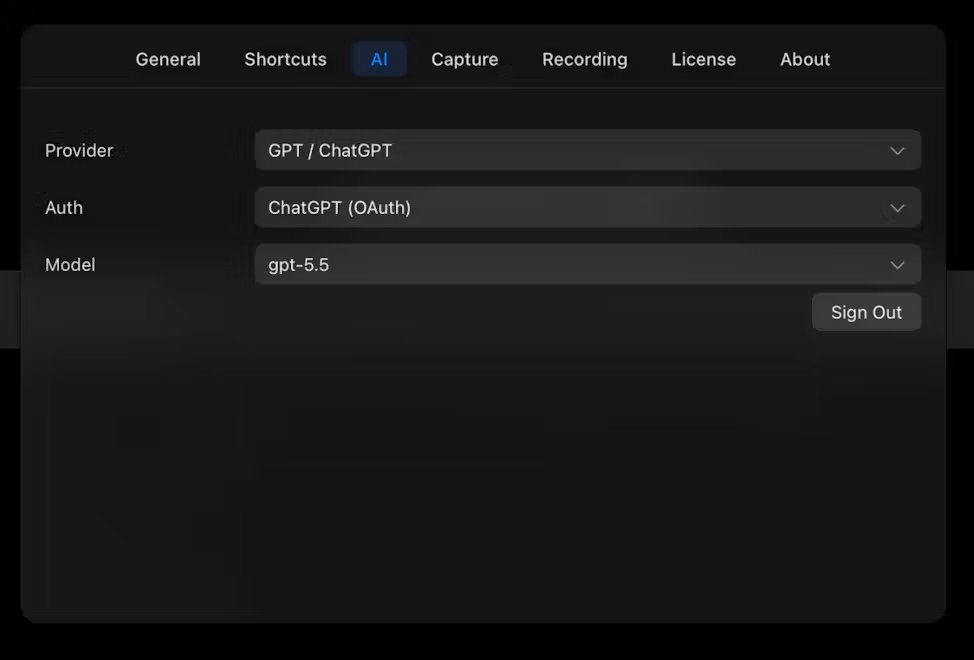
- Your ChatGPT plan (sign in). Pick GPT / ChatGPT as the provider, choose ChatGPT (OAuth), sign in once — and the AI action runs on the subscription you already pay for. No API key, no metering, no new bill. If your plan already covers ChatGPT usage, screenshot questions ride on it.
- A Claude API key. Prefer Anthropic? Paste a Claude API key and pay Anthropic per use. The setup walk-through is in bring your own Claude API key.
- Any OpenAI-compatible endpoint. A custom base URL plus a key — OpenRouter, Azure OpenAI, a self-hosted or local server, a reseller, whichever model gateway you already use. If it speaks the OpenAI API shape, iShot talks to it.
What “no forced AI plan” actually means
- The app never adds an AI charge. There is no iShot AI tier, no credits, no upsell inside the AI panel. The bill — if any — comes from your provider, on your account.
- AI is optional. The core of the app — on-device OCR, annotation, blur, scroll capture, pinning — runs without any AI connection at all. Connect a model only when you want the ask-your-screen superpower.
- You can switch or leave. Provider, auth, and model are dropdowns in Settings → AI. Change providers any time; your captures and settings stay.
Which one should you pick?
If you already pay for ChatGPT: sign in with it — zero new cost, zero setup beyond a login. If you meter with an API key (Claude, OpenAI, or via a gateway): paste the key and keep the usage-based pricing you chose. If you don’t want screenshots leaving your machine at all: point the custom endpoint at a local model and keep everything on-device. The app doesn’t care which — the AI panel behaves the same either way.
Frequently asked questions
Can I use my ChatGPT subscription instead of an API key?
Yes. Set the provider to GPT / ChatGPT, choose ChatGPT (OAuth) as the authentication, and sign in with your ChatGPT account. Screenshot AI then runs on your existing plan — no API key and no separate AI charge from iShot.
Do I need an AI subscription at all to use iShot?
No. AI is an optional layer. OCR, annotation, blur, scroll capture, and pinning run entirely on your Mac with the one-time license. Connect a provider only if you want the AI features.
Which providers and endpoints are supported?
Anthropic Claude (API key), ChatGPT (subscription sign-in), and any OpenAI-compatible endpoint via a custom base URL and key — including gateways like OpenRouter, Azure OpenAI, and self-hosted servers.
Does iShot see or store my AI prompts?
The AI request goes from the app on your Mac to the provider you configured. iShot adds no middleman server, and there’s no iShot AI account — the provider relationship is directly yours.